
10Human
The 10Human dashboard

Your company's operations hub.

Projects, tasks, deadlines, documents and mail in one piece of software. Your people work in it the way they always have, and the agents work on the same rows, under the same rules.

A free plan that does not expire. No credit card, no install: you get in with a link.

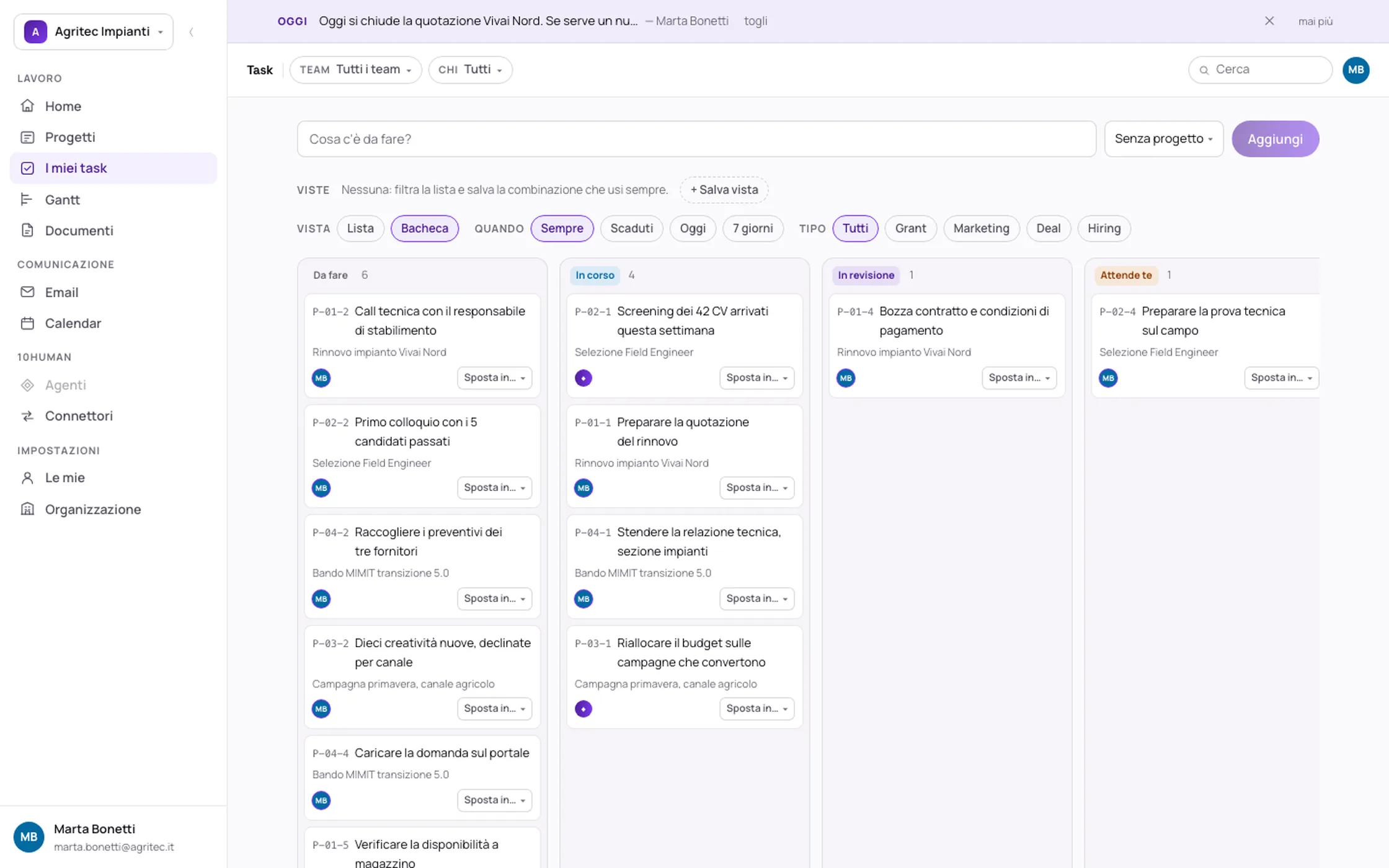
The task board in the 10Human dashboard, with the To do, In progress, In review and Waiting on you columns

Everything that's inside

It's a CRM, an ERP and a marketing manager. In the same place.

Not three subscriptions you have to make talk to each other: it's one space, with the same projects, the same people and the same permissions. Switch on the pieces you need and switch off the rest. What you switch off doesn't exist, not even for the agents.

CRM

Deals that update themselves

Deals, pipeline, quotes, notes and calls. The seller closes, they don't fill in forms.

ERP

Records and processes

Companies, contacts, jobs and the work delivered to the client, tracked instead of remembered.

Marketing

Campaigns, run every day

Budgets, creatives and numbers already read. Your marketing keeps the idea.

Projects

From tiny to enormous

A half-hour task and a twelve-month grant sit in the same list, on the same Gantt.

Documents

Upload, read, sign

The document comes in, the agent reads what it says, and the signature is requested and collected from here.

Support

Tickets, with SLAs

Client requests arrive understood and categorised, and response time is a number, not an impression.

Email

Mail handled, not just read

Messages sync, attach themselves to the right project, and the reply arrives already written for you to review.

Outreach

Your agent writes the campaigns

Lists of the right contacts and sequences built on each company's real context, queued for your approval.

All of it done by 10Humans.

One thing worth spelling out

A 10Human is a real person.

Not software with a friendly name, and not a robot replacing somebody. It's one of your people — the one already there — put in a position to deliver ten times more, because the AI and the agents beside them take away the work that adds no value.

01

The person

Decides, chooses, talks to clients, carries the responsibility. No AI does those four things for them, and we don't pretend otherwise.

02

The AI

Reads, classifies, summarises, prepares. It's the layer that removes the hours: hunting for information, retyping data, re-reading a document.

03

The agents

They work on the same rows of the dashboard, under the same rules and the same perimeter. What they do stays written down, and you can see who did it.

Ten times a person, not one person fewer.

The features

Seven things that usually live in seven pieces of software.

They are not modules to buy: they are already inside, and switch on when you need them. The ones not ready yet say so.

Booking

The calendar that fills itself.

A public link where whoever is looking for you picks from the slots genuinely free in your calendar, without creating any account. Appointment types with duration and place, extra fields if you need them, and cancellation that frees the slot.

Signing

Documents are signed where they live.

Signing is inside the project, not in a separate service: upload, request, sign, and the signed document stays attached to the work it belongs to. Nothing to print, nothing to send back.

Hiring

The interview as a path, not a folder of CVs.

Every opening has its steps — new, first interview, technical, cultural, offer — and every step its judges. Whoever assesses sees only what they should, and the decision stays written next to the person.

eNPS

Asking the team how it's going, and having a history.

Survey rounds with the question that matters, answers collected anonymously, and a result you compare with the round before. It is there to show whether something you changed worked.

Performance review

Review cycles, with the goals inside them.

Cycles with their forms, and personal goals living inside the review instead of in a separate sheet. It switches on per team or per person: not the whole company has to do it at once.

Documents

It reads what you upload, and pulls out the text.

PDFs, images, spreadsheets, presentations and archives live in one place, tied to the project and the person they are about, with the permissions that follow.

For now automatic text extraction works on PDFs. Images, photos and videos are not yet read by a model, and videos cannot be uploaded at all: when they arrive we will write it here.

Publishing

Publish a file and embed it in your site.coming

Take a document or a video already here, make it public with an address of its own, and paste it into your site without re-uploading it anywhere.

How the work goes

Fifteen seconds each. The real software, not a drawing.

Every video is a recording of the dashboard while someone uses it: no editing, no screens redrawn for the website. They start on their own and they're silent.

CRM

The deal, open in two clicks.

Filter on deals and step into the page: goal, value, delivery and who answers for it are all at the head, without hunting.

  • The type filter keeps only the deals
  • Value and delivery date on the card, before you open it
  • Inside: written goal, progress, milestones

ERP

The address book where companies and contacts end up.

Records don't live in somebody's spreadsheet: they live here, and they're the same ones the projects and the agents read.

  • Companies and contacts in one searchable list
  • The same rows used by projects and jobs
  • Who sees them is decided by the perimeter, not by habit

Marketing

The task an agent is working on.

The agent's badge is right on the row: you can see from the outside who's working on it, and you don't have to ask anyone how far along it is.

  • Filter by type: only the campaigns are left
  • The ✦ marketing badge says the agent is on it
  • Open it and the whole history of what it did is there

Projects

The same projects, in three views.

Cards, table or board: what changes is how you look at them, not what they are. A half-hour task and a twelve-month grant sit in the same list.

  • Cards to read, table to compare, board to move
  • The view you always use saves itself and comes back
  • On the Gantt, the same rows laid out in time

Support

A breakdown that becomes a ticket.

The client's request gets its own lane, with a real priority and a real deadline. It isn't an email somebody remembers to forward.

  • A ticket is a project: it has tasks, history and an owner
  • Urgency and deadline in plain sight, not in the tone of the email
  • Switch it off if you don't need it: the vertical is a toggle

Outreach

Write what's needed, the agent takes it.

Work starts where the thought starts: one line in the field at the top, and from there it becomes a task with a deadline and someone on it.

  • Quick capture: you type and press enter
  • Hand it to a person or to a 10Human
  • From then on it has a status, and the status is visible

Watch it in a minute

The first project0:56How a project starts, and why the tasks live inside it instead of in a separate list.

An example

A day inside the hub.

Not a demo: it's how the work moves in a company that stopped keeping it in three different places.

8:30

You open it and already know what matters

  • The message of the day tells everyone the one thing that has to close today.
  • Your tasks are only yours, ordered by deadline.
  • The mail that landed overnight is already read, sorted and attached to the right project.

14:00

The work moves while you talk

  • You end the call: the note stays on the project page, not on a sheet of paper.
  • You move a task to "In review" and the project percentage changes by itself.
  • The agent has finished screening the CVs and leaves you the five that made it.

18:00

You clock off, the hub doesn't

  • The Gantt shows the two deadlines at risk of slipping next week.
  • The document signed by the client has arrived, and the project knows it.
  • Tomorrow morning the team restarts from work already done, not from zero.

Nobody updated a status file. The work updated itself by being worked on.

How you start

Four steps, and nobody asks for a card.

Signing up has no password to invent and no salesperson to wait for: you leave your address, a link arrives, you're in.

  1. 1

    You leave your work email

    Nothing else: no password, no company details, no credit card.

    10 seconds

  2. 2

    A sign-in link arrives

    It's good for ten minutes. You open it and you're in, with no credentials to remember.

    1 minute

  3. 3

    You create your organisation

    You give it a name. It's born with the verticals on, the teams and the features you can switch off if you don't need them.

    2 minutes

  4. 4

    You invite the people you work with

    Everyone gets in the same way, with the perimeter you gave them. From here on, you work.

    the rest of the day

Open your space, free →The free plan doesn't expire and doesn't ask for a card.

What it costs

Start free. Then pay for how much you use it.

Usage is measured on the people who actually sign in during the month: someone with an account who never opens it doesn't count, and you don't pay for them. No annual contract, no minimum, no feature held hostage behind a higher plan.

To begin

Free

not a timed trial

For small teams

Every feature switched on: tasks, projects, Gantt, documents, email, teams. It isn't a cut-down version, and it's the same one we use ourselves.

As it grows

By tiers

on the month's usage

When more people come in

You move up a tier on the number of active people, and back down when it drops. We tell you the figures on a call, without making you fill in a form to get them.

The rules, in plain sight

  • "Active person" means they signed in at least once during the month. If they don't come in, you don't pay for them.
  • You move up and down a tier on your own, on the month's number: nobody calls you to push an upgrade.
  • Agent work is metered and only if you switch it on: it's the one line that can grow outside the tier.
  • The data is yours and it exports: if you stop, you leave with what you put in.
Start free →We'll give you the tier figures before you need them.

FAQ

Does the free plan expire?

No. It isn't a fourteen-day trial: while you're a small team it stays free, with every feature on. You pay when the number of people actually using it grows.

Where does my data live, and who sees it?

On servers in Europe, in Frankfurt. Every organisation is isolated by the database itself, not by a check written in the application: a query that forgot its filter doesn't return another company's data, it returns zero rows.

Does what we put in train your models?

No. The model providers do not train on API traffic, and that is in the contract. What you write into the dashboard stays inside your organisation: it feeds no model, and it never lands in anybody else's organisation.

Will you sign a DPA — the Article 28 processor agreement?

Yes, and we sign it before you activate the organisation, not after. It states where the processing happens (Frankfurt), the list of sub-processors, the security measures and how you leave. If your legal team has its own template, we start from theirs: write to hello@10human.com.

Do we have to abandon the tools we use?

No. Gmail, Calendar, Pipedrive and the rest connect: the hub reads from them and writes back into them. You start from one department, not from a company-wide migration.

Who counts as an "active person"?

Anyone who signed in at least once in the month. External guests — a client receiving a document to sign, a supplier who sees one project — don't count.

Are the agents included?

The dashboard always is. Agent work is the one metered line, because it's the one that costs us every time it runs: you switch it on when you need it and you see what it spent, run by run.

And if I want to leave?

You export and you close. No minimum term, no penalty, no retention call: the data you put in leaves with you.

Open it now. It takes three minutes.

There's nothing to install and nothing to buy: leave your email, get in, and see whether your work fits inside. If it doesn't, tell us.

You start on the free plan. No credit card.